Bamini Keyboard Layout Explained (2026)
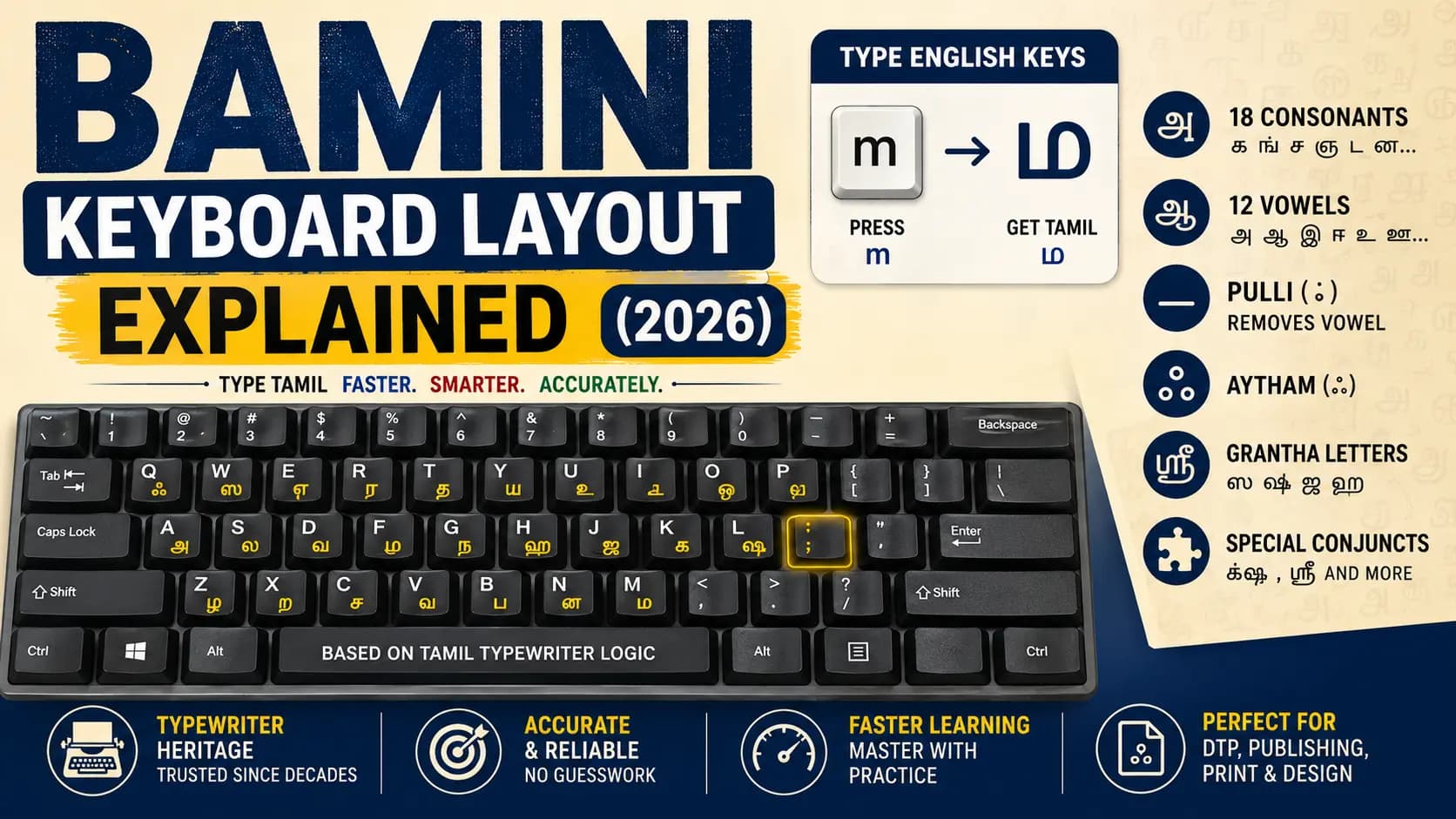
Open any Tamil DTP shop in Tamil Nadu or Sri Lanka and you will still find someone typing fast, fluent Tamil without ever looking down at the keys — and the layout under their fingers is almost always Bamini. It looks like an ordinary English keyboard. There are no Tamil letters printed on the keys. Yet every keystroke produces a full Tamil character on screen.
This confuses most beginners. You press "m" and Tamil script appears. You press a letter twice and get a longer vowel. You press a punctuation key and a consonant loses its built-in vowel sound. None of this is random — it follows a fixed, learnable logic that has stayed consistent since the Tamil typewriter era.
This guide breaks down exactly how the Bamini keyboard layout works — the character set it covers, the typing order it follows, the Pulli rule, the Grantha letters, and how to actually get comfortable typing on it. If you also need to convert existing content between encodings, the Unicode to Bamini Converter at unicodetoshreelipi.com handles that in seconds.
Table of Contents
- What Is the Bamini Keyboard Layout
- How Bamini Typing Actually Works
- A Practical Example
- Why DTP Professionals Still Use the Bamini Layout
- Bamini Layout vs Other Tamil Typing Methods
- Common Mistakes When Learning the Bamini Layout
- How to Practise the Bamini Layout
- Key Takeaways
- Conclusion
- Frequently Asked Questions
What Is the Bamini Keyboard Layout
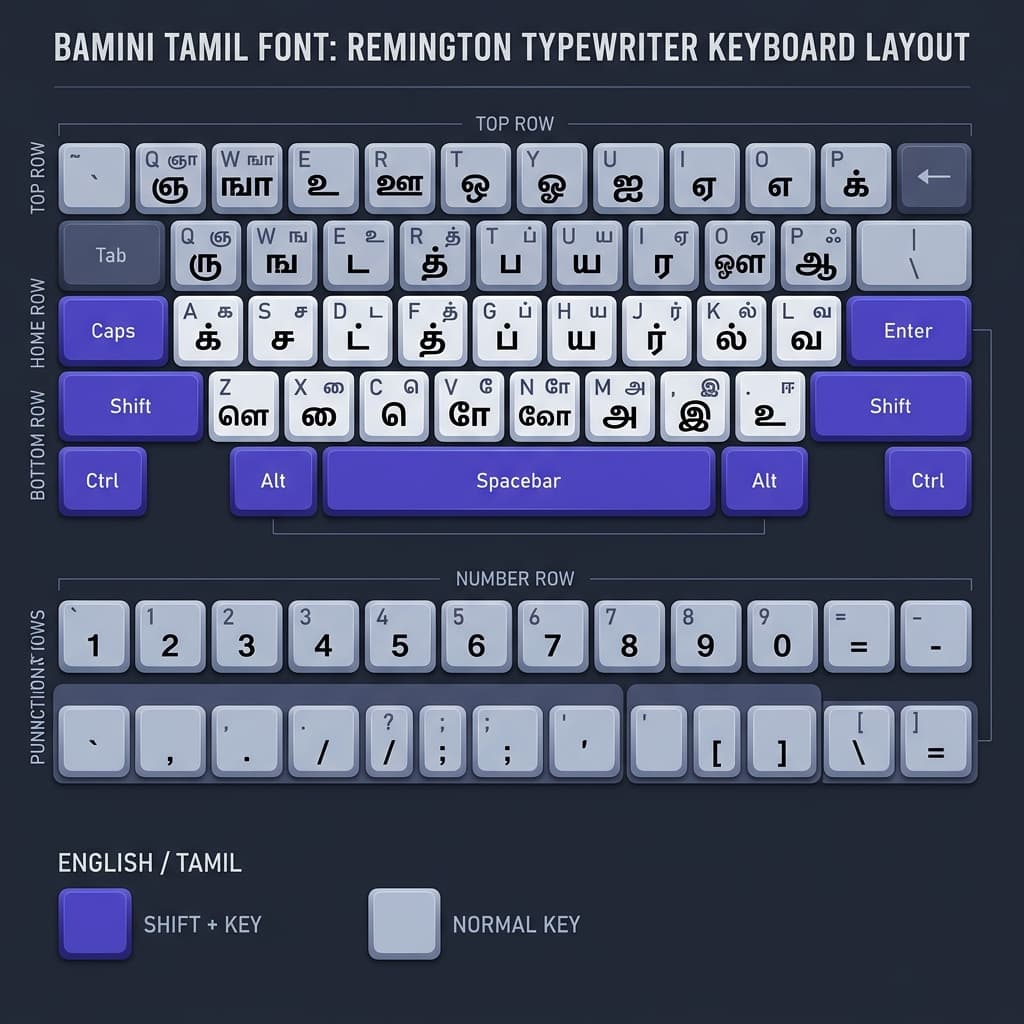
The Bamini keyboard layout is a Tamil typing system that maps Tamil letters onto a standard English QWERTY keyboard, following the arrangement of the original Tamil typewriter. It was designed before Unicode existed, at a time when Tamil computing needed a way to type using ordinary hardware keyboards that had no Tamil keys at all.
Because it is modelled on the typewriter, Bamini typing follows a consonant-before-vowel order — you type characters in the same sequence you would write them by hand, not necessarily the order they are pronounced in. This is the single biggest adjustment for anyone coming from a phonetic or Unicode-based typing habit.
The layout covers the full Tamil character set needed for everyday typing and desktop publishing:
- Eighteen base consonants: க ங ச ஞ ட ண த ந ப ம ய ர ல வ ழ ள ற ன
- Four Grantha consonants (used for Sanskrit-origin and loan words): ஸ ஷ ஜ ஹ
- Twelve vowels: அ ஆ இ ஈ உ ஊ எ ஏ ஐ ஒ ஓ ஔ
- The Pulli mark ் (removes the implicit vowel from a consonant)
- The Aytham mark ஃ
- Special conjuncts such as க்ஷ and the SRii character ஸ்ரீ, typed using key combinations
Every character on this list has a fixed key or key-combination on the Bamini layout, and the same logic applies whether you are typing a single word or a full page for print.
How Bamini Typing Actually Works
Unlike Unicode phonetic typing tools, where you type "thamizh" and the software guesses and converts it to தமிழ், Bamini has no guessing involved. Each keystroke maps directly and permanently to one Tamil character or diacritic. What you press is what you get — always the same result, every time.
Here is the core logic every Bamini typist needs to understand:
1. Every consonant carries a hidden vowel by default
In Tamil, a bare consonant is never truly "bare" — it naturally carries the அ sound unless marked otherwise. Bamini reflects this directly. Typing the key for க displays க — which already represents "ka," not just the consonant sound "k."
2. The Pulli mark removes that hidden vowel
To produce a pure consonant sound with no vowel attached (க் instead of க), you press the consonant key followed immediately by the semicolon key. This is one of the most-used rules in the entire layout, since pure consonants appear constantly in real Tamil words.
3. Vowels combine with consonants automatically on screen
When you type a consonant key followed by a vowel key, Bamini does not show two separate characters — it displays the correct combinant character, such as கி or கூ, as a single visual unit. The computer still treats this as one character for cursor movement, even though it took two keystrokes to create it.
4. Typing order follows how Tamil is written, not how it sounds
This is the part that trips up most beginners. Some Tamil vowel signs are written before the consonant they belong to (எ, ஏ, ஐ, and the signs for ொ, ோ, ௌ), even though the consonant sound is spoken first. Bamini typing follows the written order exactly — you type the vowel key before the consonant key for these cases, and after the consonant key for vowel signs like ா, ி, ீ, ு, ூ that appear after the letter.
5. Long vowels are typed with a double press or a shift combination
Short and long vowel pairs (அ/ஆ, இ/ஈ, உ/ஊ, ஒ/ஓ) are placed close together on the layout. You either press the base vowel key twice, or use a shift-combination, depending on the exact keyboard version, to get the long form.
6. Grantha letters behave exactly like normal consonants
ஸ, ஷ, ஜ, and ஹ — the letters borrowed for Sanskrit-origin and English loan words — are not treated as a separate system. They follow the exact same consonant-vowel-Pulli rules as the eighteen native Tamil consonants, just typed using their own assigned keys or key-combinations.
The Six Bamini Typing Rules at a Glance
- ✅ Every consonant carries an implicit அ vowel — ka, not just k
- ✅ Semicolon key = Pulli — removes the implicit vowel from a consonant
- ✅ Consonant + vowel key = combined character — displayed as one unit
- ✅ Typed order = written order, not spoken order
- ✅ Pre-base vowels (எ, ஏ, ஐ) — type the vowel key BEFORE the consonant key
- ✅ Grantha consonants (ஸ ஷ ஜ ஹ) — same rules as native consonants
A Practical Example
Take the word for Tamil — தமிழ். In Bamini, this is not typed by spelling out T-A-M-I-L phonetically. It is built character by character:
| Keystrokes | Tamil Output | What Happened |
|---|---|---|
| த key | த | Consonant key for த — carries implicit அ sound |
| ம key + இ vowel key | மி | Consonant followed by vowel — combines into மி |
| ழ key + ; (semicolon) | ழ் | Consonant followed by Pulli key — removes implicit vowel |
Three key groups. Three Tamil characters. No phonetic guessing, no autocorrect — just direct, predictable key-to-character mapping. This predictability is exactly why Bamini is still trusted for high-volume, professional DTP typing: once memorised, there is zero ambiguity in what will appear on screen.
Why DTP Professionals Still Use the Bamini Layout
Modern Unicode phonetic tools are easier to pick up for casual typing, so a fair question is why professional typists in Tamil Nadu and Sri Lanka still learn and use Bamini at all.
- Speed for trained typists — once the key positions are memorised, experienced Bamini typists reach very high words-per-minute speeds, because there is no need to watch for autocorrect or transliteration errors.
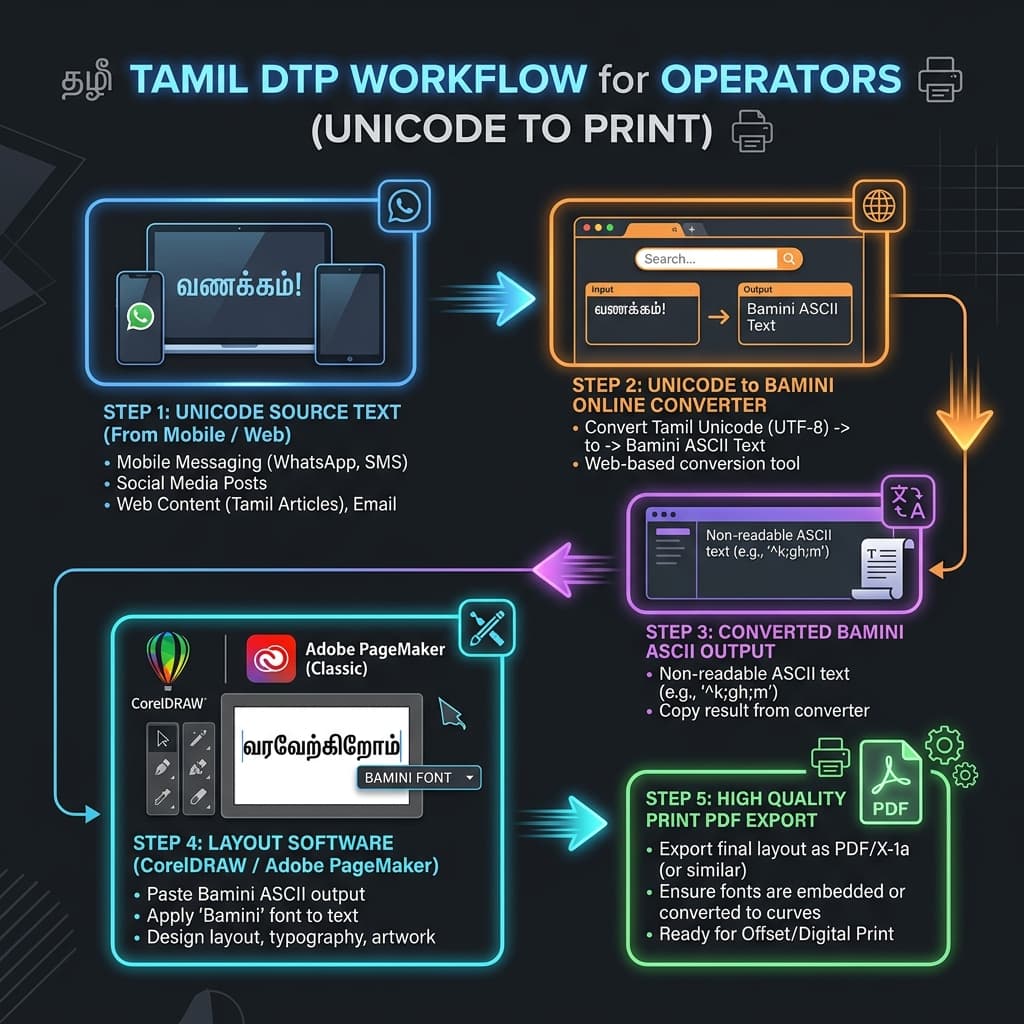
- Legacy template compatibility — huge volumes of existing PageMaker, CorelDRAW, and Photoshop templates were built with Bamini text frames. Typing directly in Bamini keeps new content compatible with these old layouts without re-building anything. See our Bamini in Adobe InDesign Guide for the full workflow.
- Offline reliability — as a font-based (ASCII) system, Bamini works in any software that supports TrueType fonts, with no dependency on Unicode-aware rendering engines.
- Institutional habit — many DTP training institutes across Tamil Nadu and Sri Lanka still teach the Bamini layout first, so a large working population of typists is already fluent in it.
- Newspaper and print workflows — a significant share of Tamil print publishing still runs on Bamini-based production pipelines, so knowing the layout remains a practical job skill.
Bamini Layout vs Other Tamil Typing Methods
Bamini vs Phonetic (Transliteration) Typing
Phonetic typing lets you type Tamil sounds using English spelling ("vanakkam" becomes வணக்கம்) and software converts it automatically. It is faster to learn but less predictable for complex or unusual words. Bamini requires memorising the layout first but gives complete, predictable control over every character.
Bamini vs Tamil99 / Inscript
Tamil99 and Inscript are Unicode-native keyboard layouts designed after Unicode became standard, arranged for typing efficiency rather than typewriter familiarity. Bamini remains typewriter-based, which is exactly why typists trained decades ago find it more natural, while newer typists often find Tamil99 more logical to learn from scratch.
Bamini vs Unicode Output
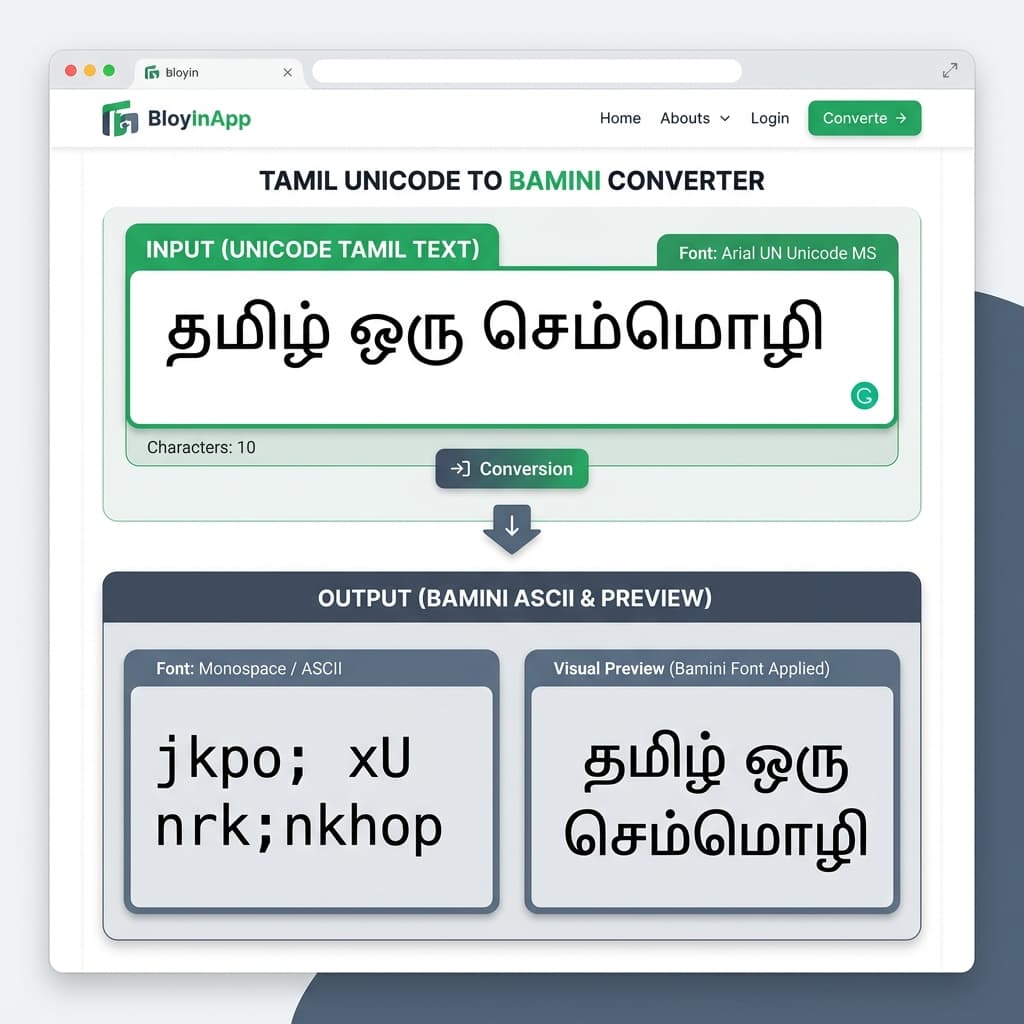
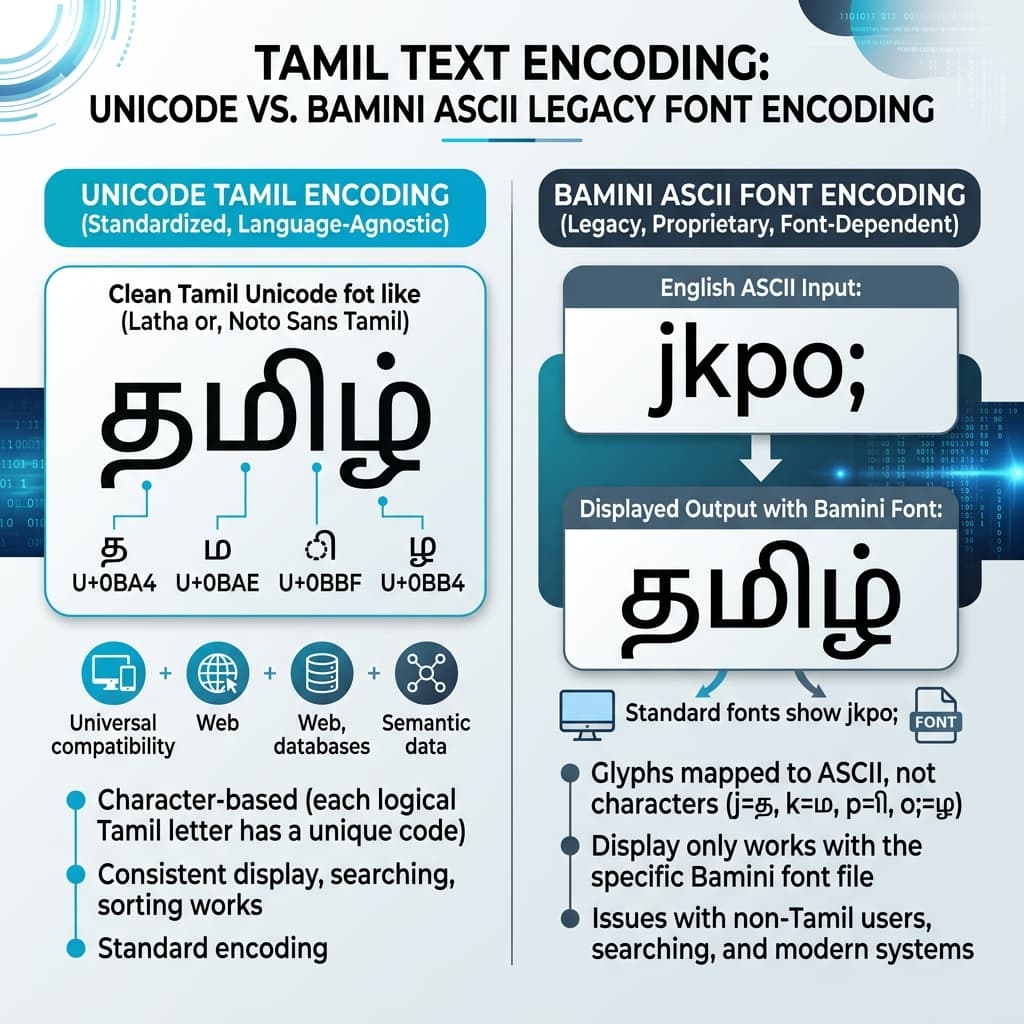
This is the most important distinction of all: Bamini is a font-mapping system, not a text-encoding standard. Text typed in Bamini only displays correctly when the Bamini font is applied — copy it into a plain text field or a search engine and it appears as random English letters, not Tamil. Unicode Tamil, by contrast, displays correctly everywhere by default. This is exactly why converting between the two remains a routine daily task for anyone publishing Tamil content both in print (Bamini) and online (Unicode). See our complete Unicode to Bamini Converter Guide and our guide on Unicode to Bamini Converter Guide for a deeper comparison.
| Property | Bamini | Phonetic / Transliteration | Tamil99 / Unicode |
|---|---|---|---|
| Learning Curve | Steep — full layout memorisation | Easy — phonetic English spelling | Moderate — logical Unicode layout |
| Output Encoding | ASCII / font-mapped | Unicode | Unicode |
| Predictability | 100% — no guessing | Good for common words, less for rare words | 100% — direct key mapping |
| Legacy DTP Compatible | Yes — native | Requires conversion | Requires conversion |
| Web / Mobile Safe | No — requires font | Yes | Yes |
| Best For | Professional DTP, print, legacy templates | Casual typing, messaging, digital content | Modern publishing, web, government use |
Common Mistakes When Learning the Bamini Layout
🔴 Typing vowels in spoken order instead of written order
The most frequent beginner error. Remember: எ, ஏ, ஐ and the signs for ொ, ோ, ௌ are typed before the consonant key, matching how they are written, not how they sound.
🔴 Forgetting the Pulli key for pure consonants
Skipping the semicolon key after a consonant leaves the implicit அ vowel attached, producing an extra unwanted syllable in the word. The Pulli is one of the highest-frequency keys in Tamil — skipping it causes cascading errors across whole sentences.
🔴 Mixing Bamini-typed text with a Unicode font
Bamini-encoded text only renders correctly in a Bamini-compatible font. Applying a Unicode font like Latha or Nirmala UI to Bamini-typed text will show garbled Latin characters instead of Tamil. Always match the encoding to the correct font.
🔴 Assuming all Bamini variants share identical key mappings
The Bamini font family spans Bamini Tamil 01 through Bamini Tamil 87, and while most share the same base layout logic, some legacy variants and regional keyboard drivers differ slightly in their exact key assignments. Always confirm the layout matches the specific Bamini font variant your project or press requires.
🔴 Not checking output before sending to print
Since Bamini text looks like scrambled English in any non-Bamini font or plain text box, always preview the final text with the correct Bamini font applied before finalising a design or converting it for a client. A 30-second check prevents press-day emergencies.
How to Practise the Bamini Layout
- Start with pure consonants and the Pulli rule — this single rule underpins a large share of correct Bamini typing. Master the semicolon key early.
- Move to simple two-letter words before attempting full sentences, so you build muscle memory for the consonant-then-vowel key order.
- Pay special attention to the pre-base vowels (எ, ஏ, ஐ) early on, since they are the rule most likely to cause repeated mistakes later.
- Use existing Unicode Tamil text as practice material — copy any Tamil paragraph, convert it with the Unicode to Bamini Converter at unicodetoshreelipi.com, and use the output to check whether your manual typing matches the expected result.
- Download the Bamini fonts from unicodetoshreelipi.com/fonts and always type and check inside the actual Bamini font you plan to use for your final DTP or print output, not just in a generic system font, so you catch any rendering issues early.
- Practise in the actual software you will use for production — CorelDRAW, PageMaker, or Photoshop — so your muscle memory develops in the right environment.
Key Takeaways
- The Bamini keyboard layout maps Tamil onto a standard QWERTY keyboard, modelled on the original Tamil typewriter arrangement.
- Every consonant carries an implicit அ vowel — remove it with the Pulli (semicolon key) when you need a pure consonant sound.
- Typing order follows written Tamil, not spoken Tamil — pre-base vowels like எ, ஏ, ஐ are typed before the consonant key.
- The Bamini font family covers Bamini Tamil 01 through 87 — always match the key mapping to the exact variant your project uses.
- Bamini text is ASCII-encoded — it looks like random English without the correct font and is not compatible with Unicode renderers or web publishing.
- Converting between Bamini and Unicode is a standard daily task — use the Unicode to Bamini Converter at unicodetoshreelipi.com.
Conclusion
The Bamini keyboard layout is not complicated — it is systematic. Once you understand the six core rules, every character in the Tamil script falls into place: consonants carry their vowel until you remove it, pre-base vowel diacritics are typed before the consonant key, and the Pulli semicolon is the most important key on the entire board.
For Tamil DTP professionals in Tamil Nadu and Sri Lanka, Bamini remains the dominant professional typing method because the entire legacy print infrastructure — PageMaker templates, CorelDRAW layouts, Photoshop composites — was built on it. Learning it is a practical investment in employability and production speed.
For anyone who needs to move content between Bamini print workflows and Unicode digital publishing, the Unicode to Bamini Converter at unicodetoshreelipi.com is the tool that bridges both worlds — instantly, accurately, and without re-typing a single character. And for a complete walkthrough of converting existing Tamil content, the Unicode to Bamini Converter Guide covers every step from input to press-ready output.
Whether you are beginning your Bamini typing journey or refreshing the rules after years away from the keyboard, the layout rewards systematic practice with speed and precision that phonetic tools simply cannot match for professional DTP work.
Ready to convert? Our main tool handles Unicode ↔ Shree Lipi with the same accuracy and speed — instantly in your browser.
Try Unicode ↔ Shree Lipi Converter