Bamini vs TSCII vs Unicode: Key Differences Explained
Copy the same-looking Tamil word from three different old files, and you might get three completely different results when you paste it somewhere else. One pastes as perfect Tamil. One turns into random English letters. One shows boxes or question marks. This is not a bug — it's the direct result of three different Tamil text systems that all became popular for different reasons, at different times, for different purposes: Bamini, TSCII, and Unicode.
If you work with Tamil content — DTP, publishing, web content, or archival documents — understanding the real difference between these three is the difference between clean, reliable Tamil text and hours of garbled-character troubleshooting. If you want to dive deeper into how fonts work, you can check out Unicode vs ASCII — How Tamil Fonts Actually Work.

Short Intro Bamini vs TSCII vs Unicode
Unicode is a universal character-encoding standard. It represents Tamil letters as fixed code points that display correctly on any modern device or software, with no special font required.
TSCII (Tamil Script Code for Information Interchange) is an older, Tamil-specific encoding standard, built before Unicode's Tamil support matured, that stores Tamil text using its own visual-order byte structure.
Bamini is not an encoding standard at all — it is a font-mapping system. It stores Tamil words as ordinary ASCII bytes and relies entirely on a specific font file to redraw those bytes as Tamil letters on screen.
All three can look identical on screen. Underneath, they are structurally unrelated systems.
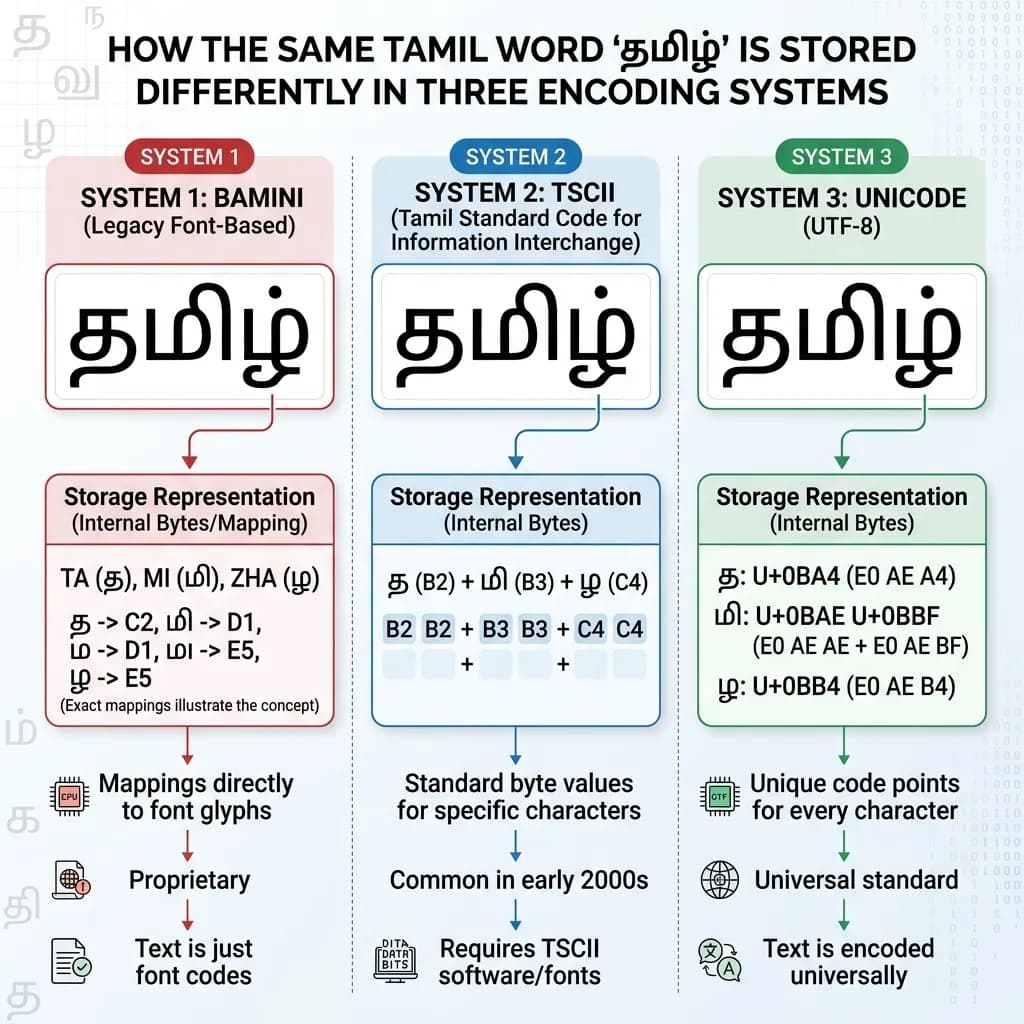
Same visible Tamil word, three completely different systems storing it underneath.
What Is Unicode Tamil
Unicode Tamil is part of the global Unicode standard, occupying a dedicated Tamil block. It follows logical order encoding — based on ISCII — meaning characters are stored in the order they are logically composed (consonant, then vowel sign), and the software handles correct visual display automatically.
Unicode Tamil represents a defined set of base vowels and consonants as individual code points, and modern software combines them correctly using standard text-shaping rules. Because it is a universal standard, Unicode Tamil text displays correctly in browsers, search engines, social media, and virtually all modern software — with no special font required.
This is why Unicode is the only option that works for websites, SEO, and any content meant to be searchable, indexable, or shared across platforms.
What Is TSCII
TSCII stands for Tamil Script Code for Information Interchange. It emerged in the mid-1990s specifically to solve a real problem of that era: multiple incompatible, custom-coded Tamil fonts were circulating across mailing lists and early Tamil computing forums, and none of them worked with each other. TSCII was created as a shared standard so Tamil text could be exchanged reliably between different systems of that time.
Structurally, TSCII is a glyph-based, visual-order encoding. Unlike Unicode, which stores only base vowels and consonants, TSCII includes combined vowel-consonant (abugida) glyphs as distinct entries in its own right. This is a fundamentally different design philosophy from Unicode's logical-order approach — and it's exactly why TSCII text does not convert one-to-one into Unicode; a proper converter has to interpret and remap the structure, not just swap characters.
TSCII still appears in legacy Tamil software, older archived documents, and some regional applications that were built before Unicode Tamil support became reliable.
What Is Bamini
Bamini takes a completely different approach from both of the above. It is not a registered text-encoding standard — it's a font-mapping system, built on the layout of the old Tamil typewriter keyboard. If you need to learn it, see our Bamini Keyboard Layout Guide.
In Bamini, a Tamil word is actually stored as plain ASCII characters — the same character range used for ordinary English text. The Tamil appearance only exists because a specific Bamini font file is applied, and that font redraws each ASCII byte as a Tamil glyph. Remove the font, or paste the text into a plain text field, and it reverts to what it always technically was: scrambled-looking English letters.
This font-dependency is exactly why Bamini remains common in Tamil DTP and print workflows — where a fixed font and fixed layout software make it entirely reliable — but is completely unsuitable for the web, since search engines and browsers have no way to know a Bamini font should be applied. For converting Unicode to Bamini, refer to our Unicode to Bamini Converter Guide.
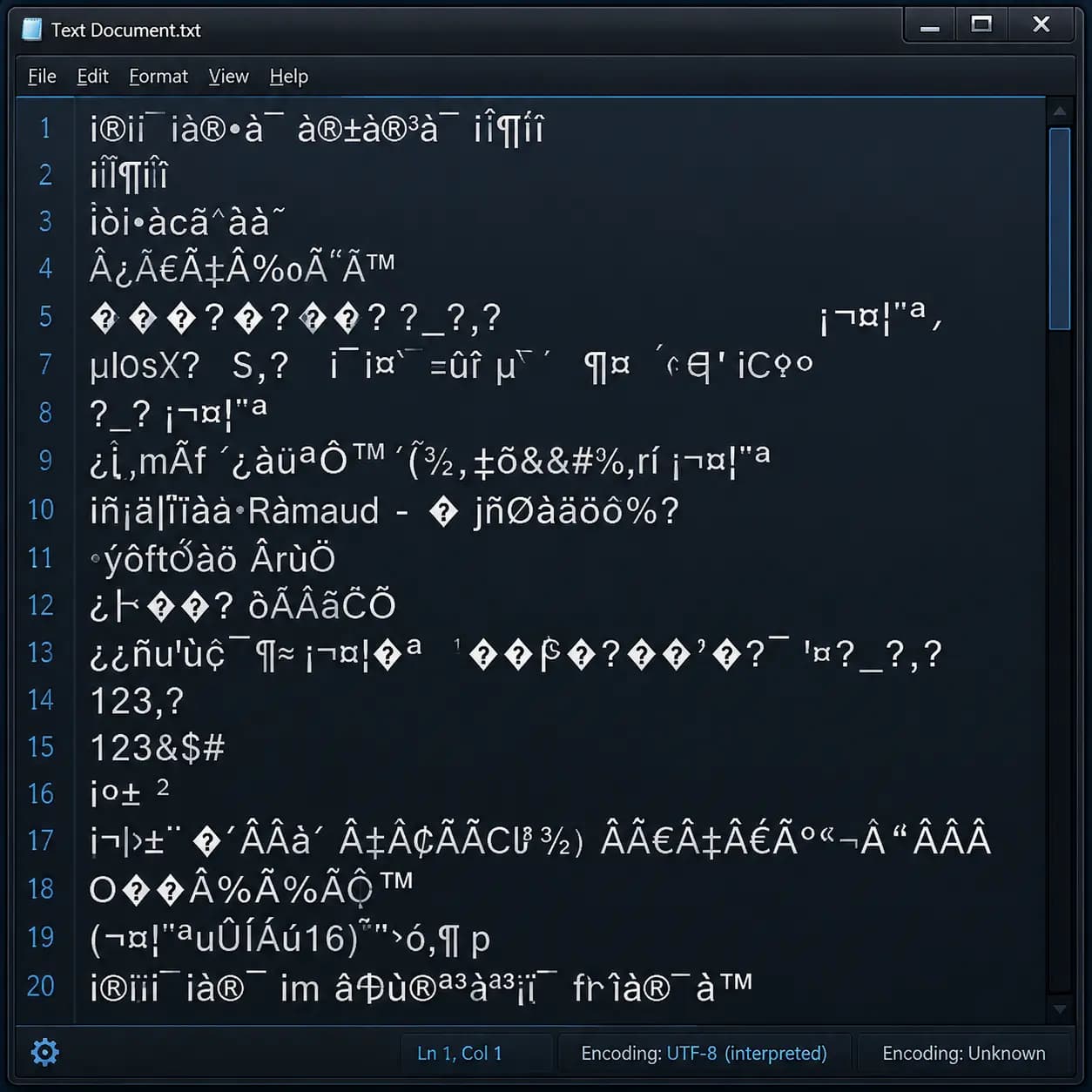
This is what happens when Bamini or TSCII text is opened without the matching font or converter.
Bamini vs TSCII vs Unicode — Direct Comparison
- Encoding type: Bamini is font-mapped ASCII with no real encoding standard behind it. TSCII is a genuine Tamil-specific encoding standard with its own byte structure. Unicode is a universal, internationally maintained encoding standard.
- Character order: Bamini follows Tamil typewriter key order. TSCII uses visual order, storing combined vowel-consonant glyphs directly. Unicode uses logical order, based on ISCII, composing characters through standard text-shaping rules.
- Font dependency: Bamini text is unreadable without its exact matching font. TSCII text needs a TSCII-aware font or converter to render correctly. Unicode Tamil renders correctly with any standard Unicode-Tamil font already installed on virtually every modern device.
- Web and SEO compatibility: Bamini and TSCII are both effectively invisible to search engines, since crawlers read the underlying ASCII/byte values, not the visual glyphs. Unicode is fully search-engine readable and indexable — it is the only one of the three suitable for a Tamil website.
- Primary use today: Bamini remains active in DTP, print, and legacy design template workflows. TSCII mainly survives in older archived documents and legacy regional software. Unicode is the standard for everything modern — websites, apps, social media, and general digital communication.
- Conversion between systems: None of the three convert perfectly one-to-one with each other, because each stores Tamil text on a different underlying structure. A dedicated converter is required to move text reliably between any two of them — direct copy-paste alone will not work.
Which One Should You Actually Use
If your content is going on a website, into search engines, or anywhere that needs to be readable by any device without a special font — use Unicode. There is no real alternative for modern digital publishing.
If you are opening, editing, or preparing legacy documents, or working inside DTP software with existing Bamini-based templates for print, Bamini remains the practical working format — just remember it needs conversion to Unicode before it can be used online. You can use our Unicode to Bamini Converter for this.
If you come across older archived Tamil files, mailing-list content, or legacy regional software output, there's a reasonable chance it's in TSCII, and it will need a proper TSCII-to-Unicode conversion before it's usable in any modern context. Our Unicode to TSCII Converter at unicodetoshreelipi.com handles this.
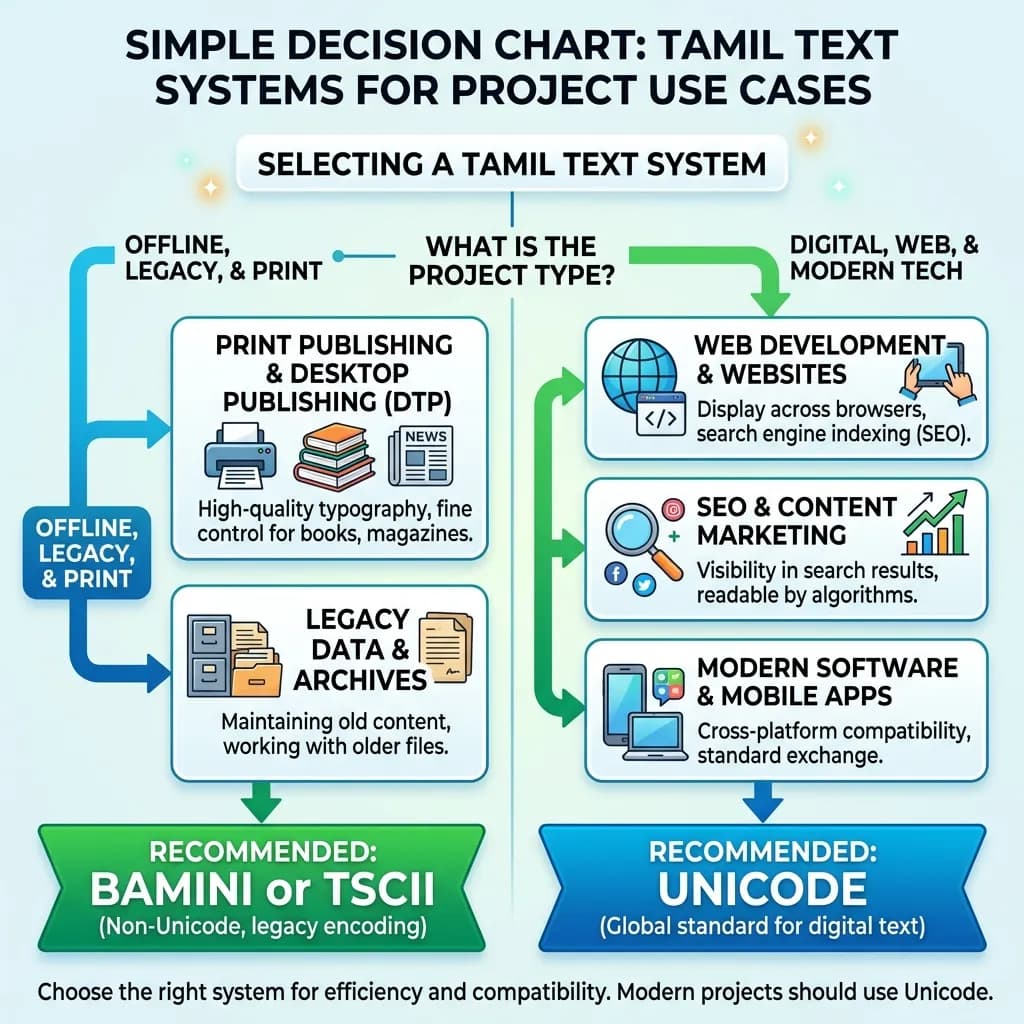
Print and legacy DTP lean Bamini or TSCII. Web, SEO, and modern software need Unicode.
Conclusion
Bamini, TSCII, and Unicode can all show identical-looking Tamil words on screen, but they represent three fundamentally different approaches to storing that text — one font-dependent, one a legacy Tamil-specific standard, and one a universal global standard. Knowing which system your content is actually in — and converting it correctly when it needs to move between print, legacy software, and the web — is the difference between clean Tamil text and hours of garbled-character debugging.
For moving content between these systems reliably, the Unicode to Bamini Converter and Unicode to TSCII Converter at unicodetoshreelipi.com handle the structural conversion correctly in both directions, so your Tamil text displays exactly as intended wherever it's used.
Frequently Asked Questions
Ready to convert? Our main tool handles Unicode ↔ Shree Lipi with the same accuracy and speed — instantly in your browser.
Try Unicode ↔ Shree Lipi Converter