DigiLocker Se Marksheet Kaise Download Kare (2027 Guide)
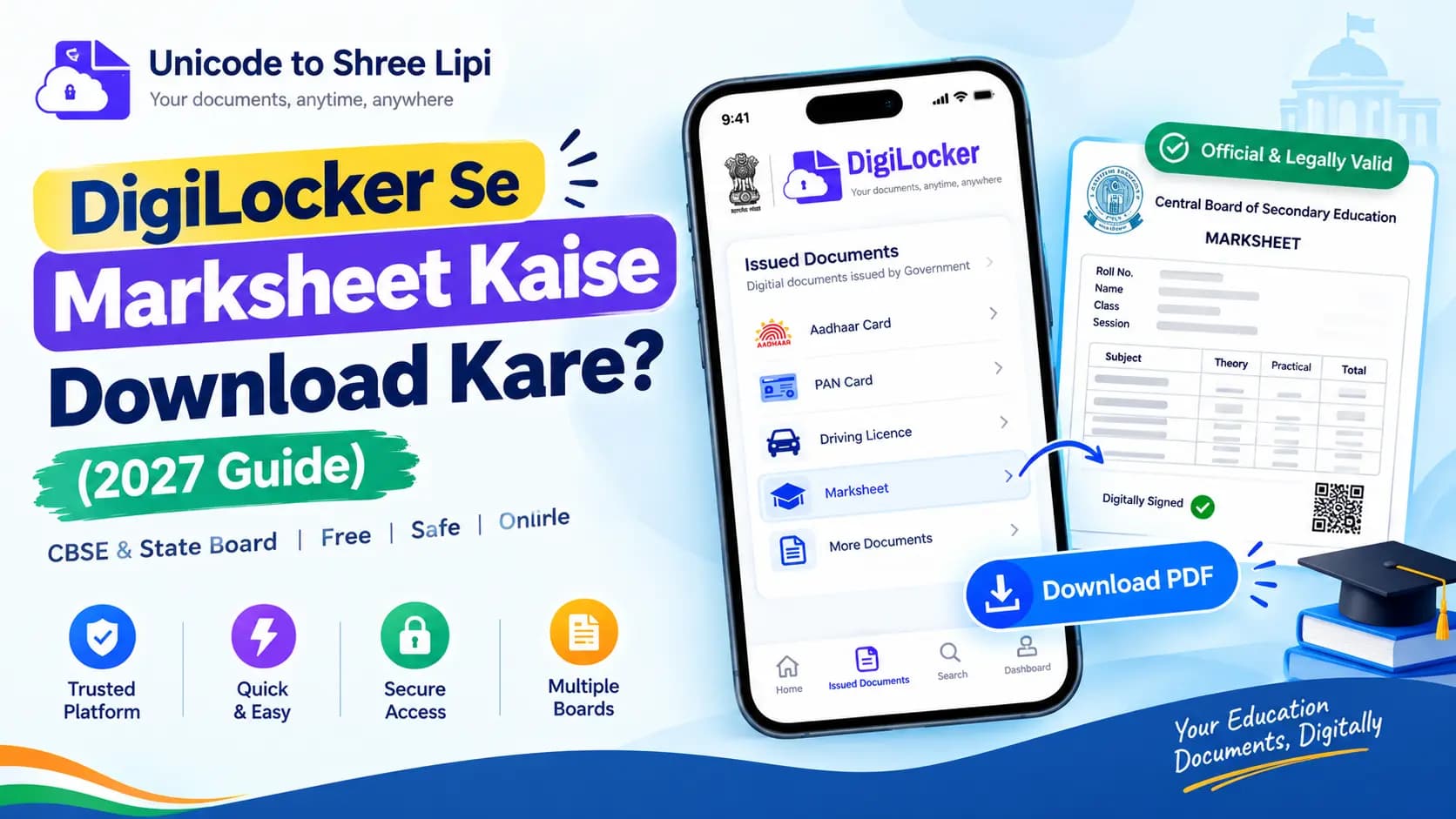
Your results are out, and you need a marksheet for college admission or a scholarship application? You don't have to wait for your school to provide the original paper marksheet. DigiLocker lets you download your digital marksheet for free. CBSE and many state boards provide Class 10 and Class 12 marksheets through DigiLocker. Follow this simple guide to download your marksheet online.
Quick Answer: Marksheet Download in 60 Seconds
Log in to DigiLocker with your Aadhaar-linked mobile number, open Issued Documents (or search "CBSE" under Education), pick your Class 10 or 12 marksheet, enter your roll number and passing year, and download the signed PDF.
Table of Contents
What You Need Before You Start
Before sitting down to fetch your certificate, make sure you have the following details ready:
Pre-requisites Checklist
- ✓A DigiLocker Account: If you don't have one yet, read our DigiLocker beginner guide to set up your free account in under 3 minutes.
- ✓Aadhaar-Linked Mobile Number: Required to receive OTP verification during sign-in.
- ✓Roll Number & Passing Year: Exactly as written on your board admit card or hall ticket.
- ✓CBSE School Access Code (For CBSE Students): Schools distribute a 6-digit access code (security PIN) to activate student accounts directly on cbseservices.digilocker.gov.in.
- ✓APAAR ID (Automated Sync): Official reports confirm that students whose APAAR (Automated Permanent Academic Account Registry) ID is linked with CBSE find their marksheet automatically populated inside Issued Documents with zero manual steps!
How to Download CBSE Marksheet from DigiLocker (Step by Step)
Downloading your Class X or Class XII marksheet from CBSE takes only a few clicks. Follow these exact steps:
1Step 1 — Sign In to DigiLocker
Open the official DigiLocker app on your mobile phone or visit digilocker.gov.in in your browser. Sign in using your Aadhaar number or registered mobile number and enter the OTP received.
2Step 2 — Check "Issued Documents"
Go to the Issued Documents tab. If CBSE has pre-linked your result through your school credentials or APAAR ID, your Class X or Class XII marksheet and pass certificate will already be listed here. Tap it to view or save.
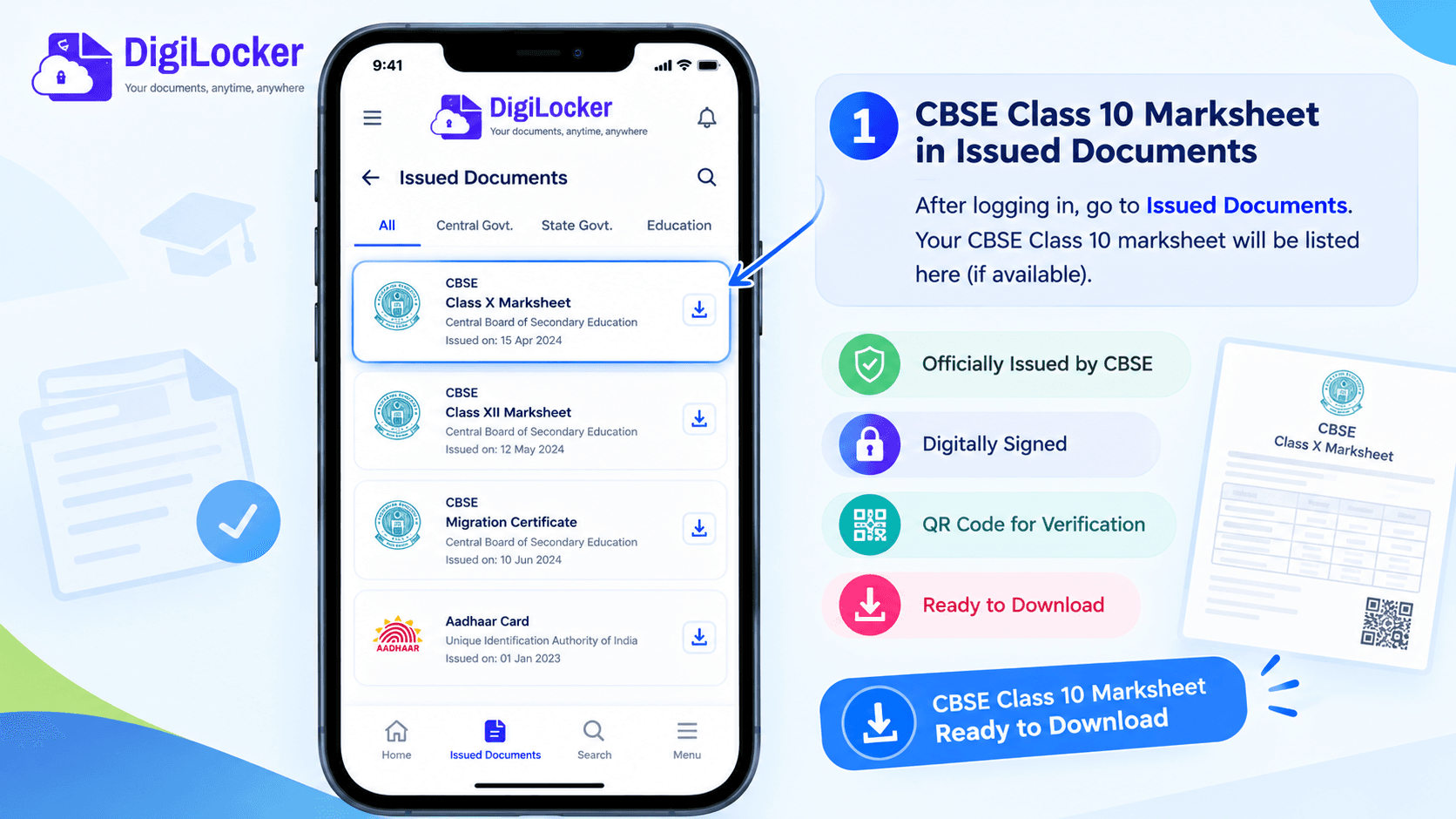
If your marksheet is already uploaded, it appears right here in Issued Documents.
3Step 3 — Search for CBSE Under Education
If the document is not already listed, click on Search Documents, choose the Education category, and select Central Board of Secondary Education (CBSE). Pick Class X Marksheet or Class XII Marksheet.
4Step 4 — Enter Roll Number & Passing Year
Enter the required student details: your Roll Number,Passing Year, and your 5-digit School Code (as printed on your admit card).
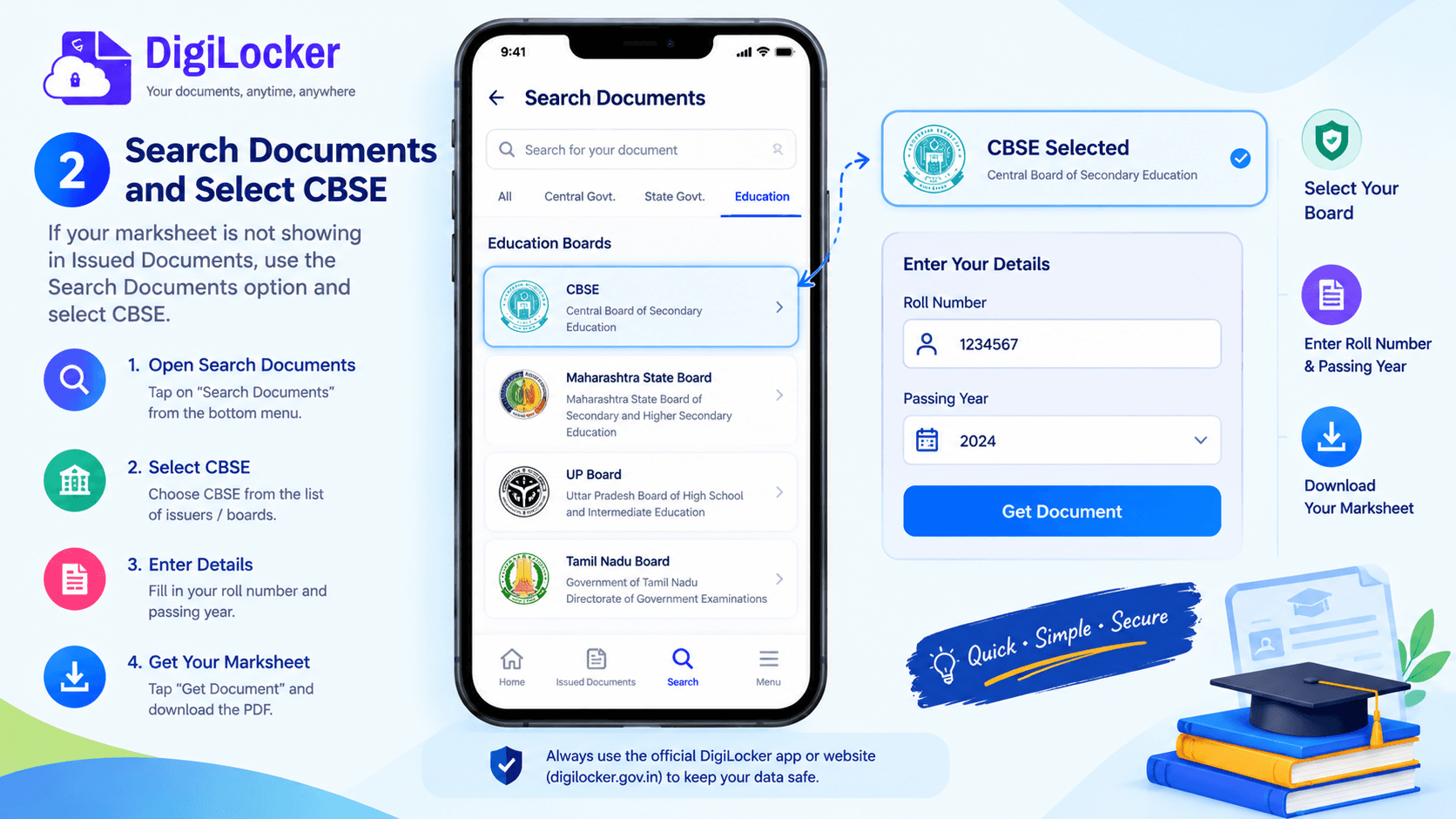
Not listed automatically? Search CBSE, pick the marksheet and enter your roll number and year.
5Step 5 — Tap "Get Document"
Check the declaration box consenting to fetch data from CBSE and tap Get Document. DigiLocker will communicate with CBSE servers and pull your authentic marksheet directly into your Issued Documents repository.
6Step 6 — Download Digitally Signed PDF
Open the newly fetched marksheet from Issued Documents and click Download PDF. The file comes complete with an embedded cryptographic digital signature and an official QR code for instant offline and online verification.
💡 Official Milestone: In recent board examinations, around 42 lakh Class 10 and Class 12 students received their digital marksheets and migration certificates directly through DigiLocker, according to education data reported by Careers360.
| Step | Screen / Action | Required Inputs |
|---|---|---|
| 1 | Sign In | Aadhaar / Mobile + OTP |
| 2 | Issued Documents | Auto-linked records (APAAR / School sync) |
| 3 | Search Documents | Select CBSE → Class X or Class XII |
| 4 | Submit Details | Roll Number, Year, School Code |
| 5 | Fetch Record | Tap "Get Document" |
| 6 | Save PDF | Signed PDF with QR Code |
Other Boards and Universities
DigiLocker is not just for CBSE students. Students from state education boards, polytechnic councils, and universities across India can download their academic certificates following virtually the exact same steps.
To access other boards: open the Education section in DigiLocker, locate your specific state board or university (for example, Maharashtra State Board (MSBSHSE), Uttar Pradesh Madhyamik Shiksha Parishad (UPMSP), Bihar School Examination Board (BSEB), or ICSE/CISCE), select the certificate type, and enter your seat number or roll number.
The National Academic Depository (NAD) Backbone
Behind this seamless digital integration is the National Academic Depository (NAD), approved by the Union Cabinet on 27 October 2016. The Ministry of Education serves as its parent ministry, with the University Grants Commission (UGC) as the nodal agency.
Through the NAD framework (accessible at nad.digilocker.gov.in), colleges, universities, and boards continuously lodge degrees, diplomas, and marksheets. This guarantees that your credentials remain permanently accessible from any device.
Accessing via Mobile App: You can also access all your DigiLocker certificates through the unified government portal app — check out our complete UMANG app guide to learn how to fetch academic and government records in one place.
DigiLocker Marksheet Not Showing? Problem and Solution
If your marksheet does not appear immediately after results are announced, don't panic. Here are the most frequent reasons and their exact solutions:
| Reported Issue | Root Cause | Actionable Fix |
|---|---|---|
| Blank list / Nothing appears | Results just declared; server uploading | Wait 2–4 hours. Boards upload database records in gradual batches. Refresh the app. |
| CBSE account not activated | Access code not entered | Visit cbseservices.digilocker.gov.in and enter the 6-digit access PIN provided by your school. |
| "Document not found" error | Mismatched roll number or school code | Double-check admit card. Ensure you selected Class 10 or 12 correctly and entered the correct passing year. |
| Mobile number not registered with CBSE | School used a different phone number | Sign in using your Aadhaar OTP, open Pull Partner Documents, select CBSE, and pull via roll number. |
| Forgotten PIN or Login lock | Wrong 6-digit security PIN entered | Follow our step-by-step DigiLocker PIN and password reset guide to regain access in under 2 minutes. |
Is a DigiLocker Marksheet Valid?
Yes, absolutely. Many students worry whether colleges or companies will accept a digital PDF printout instead of the school's embossed original certificate. Under Indian law, a DigiLocker document is 100% genuine and legally binding.
Legal Backing Under the Information Technology Act
Under Rule 9A of the Information Technology (Preservation and Retention of Information by Intermediaries Providing Digital Locker Facilities) Rules, 2016 (notified in February 2017), electronic records issued to a citizen's DigiLocker account are legally treated at par with original physical documents.
Because each downloaded marksheet carries a cryptographic digital signature from CBSE or the state board along with an official QR Code, receiving institutions can independently verify its authenticity within seconds.
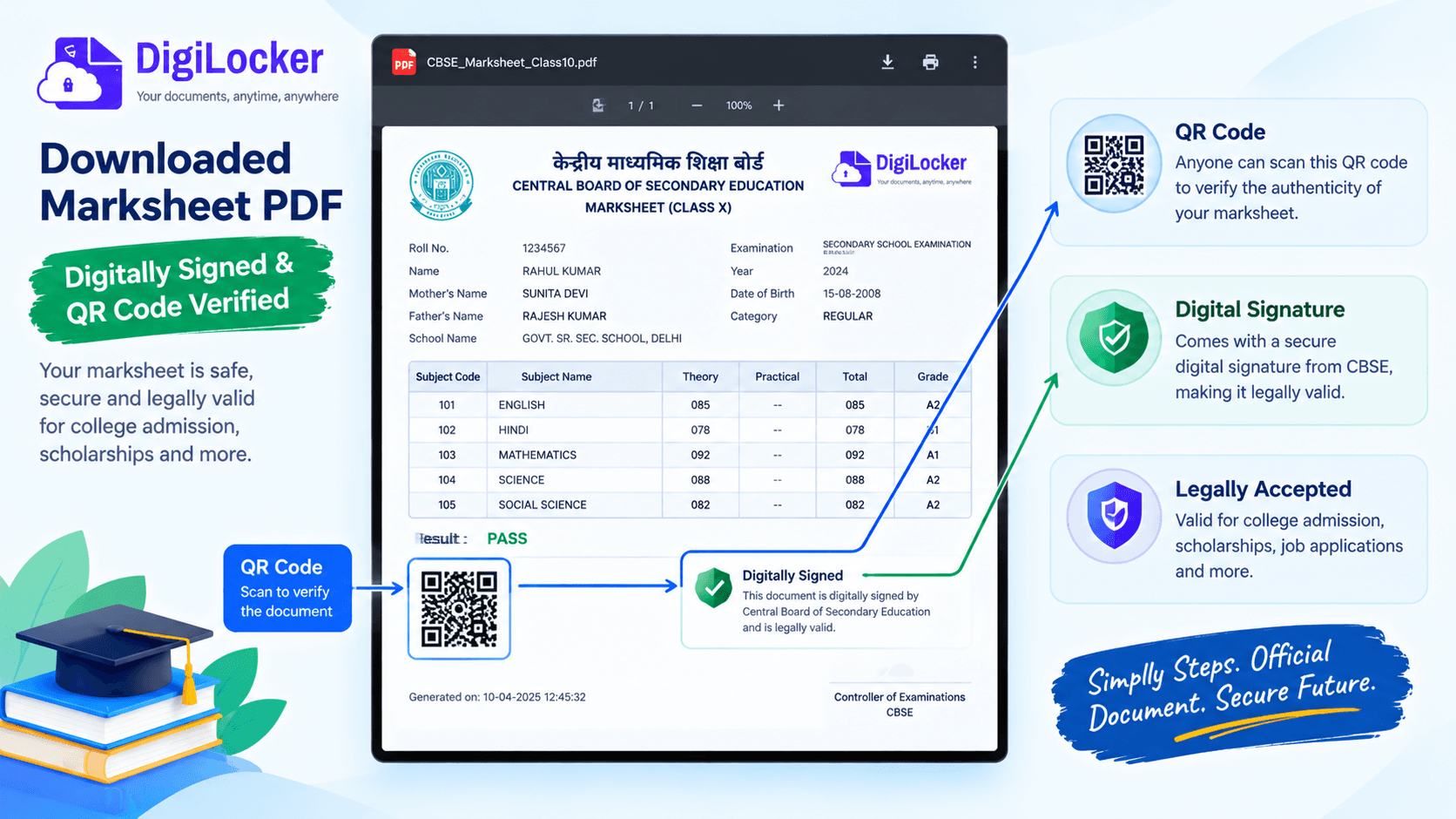
The digital signature and QR code are what make this PDF verifiable.
You can confidently use your downloaded DigiLocker marksheet for:
- College & University Admissions: Including DU, Mumbai University, Anna University, IITs, and NITs.
- National & State Scholarship Portals: Such as the National Scholarship Portal (NSP).
- Competitive Examinations: UPSC, SSC, Banking (IBPS), State PSC forms, and CUET counselling.
- Job Verification & Background Checks: Accepted by both public sector undertakings and multinational corporations.
Common Mistakes to Avoid
Watch Out for These 5 Common Errors
- Uploading a photo to "Drive" instead of "Issued Documents": Uploaded images are unverified self-uploads. Only documents fetched from the board into Issued Documents carry official legal validity.
- Entering wrong class or examination year: Always verify whether you selected Class X or Class XII on the selection screen.
- Sharing OTPs or Security PINs: DigiLocker or school representatives will never call asking for your 6-digit PIN or OTP.
- Not keeping a secure backup: After downloading the PDF, store it safely on your phone using encrypted storage. See our guide on how to store digital documents safely on your phone.
- Ignoring Migration and Passing Certificates: CBSE issues three separate documents on DigiLocker: the Marksheet, the Migration Certificate, and the Passing Certificate. Make sure to download all three for admission purposes.
📌 Key Takeaways
- DigiLocker marksheet downloads are 100% free and instantaneous.
- Digitally signed PDFs are legally recognized across colleges, government jobs, and scholarship portals.
- CBSE accounts can be activated using the 6-digit access code from your school at cbseservices.digilocker.gov.in.
- Students with APAAR IDs will find results auto-linked in Issued Documents.
Conclusion
Downloading your marksheet from DigiLocker takes only a few minutes: log in with your Aadhaar-linked mobile number, open Issued Documents or search your board under Education, enter your roll number and year, and save the signed PDF.
If it doesn't show immediately, activate your CBSE account using your school access code, double-check your roll number against your admit card, or use Pull Partner Documents. With official digital signatures and QR code verification, your DigiLocker marksheet is completely legally valid for any college admission, scholarship, or job application across India.
Frequently Asked Questions
Ready to convert? Our main tool handles Unicode ↔ Shree Lipi with the same accuracy and speed — instantly in your browser.
Try Unicode ↔ Shree Lipi Converter